From ICIHelp8.1
(Created page with " = Currencies =") |
|||
| Line 1: | Line 1: | ||
= Currencies = | = Currencies = | ||
| + | |||
| + | == Searching a Currency == | ||
| + | |||
| + | In ICM, you can use various options given below, including the dynamic search feature, to find the desired currency. | ||
| + | |||
| + | There are two ways of searching currencies. | ||
| + | |||
| + | '''Option 1''' | ||
| + | |||
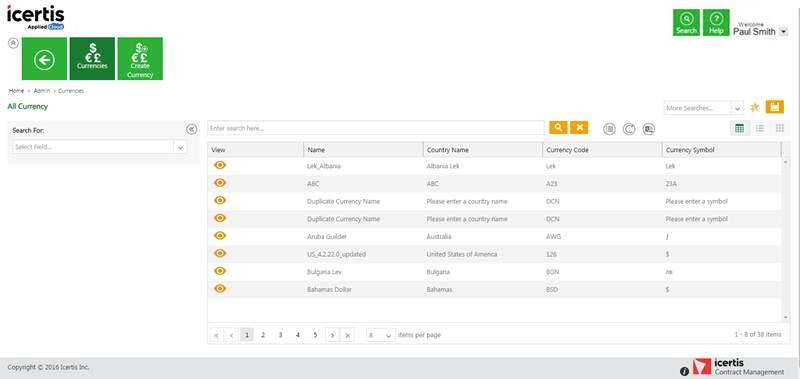
| + | #<div class="image-green-border">'''Click''' the ''Currencies'' tile on the ''User Administration'' page. The ''Currencies'' page appears with existing number of currencies.<br/> [[File:Admin - Currency tile.png|RTENOTITLE]]</div> | ||
| + | |||
| + | | ||
| + | <ol start="2"> | ||
| + | <li>'''Search''' for a particular currency using one of the following options: | ||
| + | *<div class="image-green-border">'''Click''' the ''Select Field'' list under ''Search For'' and '''select''' appropriate item. Search results relevant to the item are displayed with a number in bracket. The number denotes the number of currencies that meet the search criteria.<br/> [[File:Search currency record.png|RTENOTITLE]]</div> | ||
| + | * | ||
| + | '''Click''' the box to select specific item. A list of currencies relevant to the item is displayed. | ||
| + | </li> | ||
| + | |||
| + | <ol start="3"> | ||
| + | <li>'''Type''' relevant keyword in the ''Custom Keyword'' box to narrow your search further, and '''click''' ''Apply''.</li> | ||
| + | </ol> | ||
| + | |||
| + | '''Option 2''' | ||
| + | |||
| + | T'''ype''' the ''keywords'' in the box provided above the list of currencies. A list of relevant currencies is displayed. Narrow your search results as follows: | ||
| + | |||
| + | {| | ||
| + | |- | ||
| + | | '''Search Term''' | ||
| + | | '''Result''' | ||
| + | |- | ||
| + | | "..." | ||
| + | | Type the search term in double quotation marks.<br/> It shows existing currencies that include the exact search term. | ||
| + | |- | ||
| + | | *...* | ||
| + | | Type the search term in star characters.<br/> It shows existing currencies that include the exact search term. | ||
| + | |- | ||
| + | | *... | ||
| + | | Prefix * to the search term.<br/> It shows existing currencies that end with this term. For example, *INR | ||
| + | |- | ||
| + | | ...* | ||
| + | | Suffix * to the search term.<br/> It shows existing currencies that start with this term. | ||
| + | |} | ||
| + | |||
| + | | ||
| + | |||
| + | === '''Viewing the saved search terms''' === | ||
| + | |||
| + | View your saved search terms with the following: | ||
| + | |||
| + | *In the More Searches box, select your saved search, and '''click''' [[File:Fav.jpeg|RTENOTITLE]] to mark the search term as favorite. | ||
| + | *You can find your marked favorites below the tiles. | ||
| + | |||
| + | == Creating a Currency == | ||
| + | |||
| + | ICM allows you to create currencies that you can use while creating Contract Types. | ||
| + | |||
| + | To create a Currency: | ||
| + | |||
| + | #<div class="image-green-border">'''Click''' the ''Currencies'' tile on the ''User Administration'' page. The ''Currencies'' page opens.<br/> [[File:Cur tile.jpeg|RTENOTITLE]]</div> | ||
| + | #'''Click''' the ''Create Currency'' tile. The ''Create Currency'' page opens and consists of following tabs: | ||
| + | #*Details | ||
| + | #*<div class="image-green-border">Verify<br/> <br/> [[File:Create Currency- Details.png|RTENOTITLE]]</div> | ||
| + | #'''Click''' ''Next'' to go to next tab. The ''Verify'' section opens. | ||
| + | #<div class="image-green-border">Verify the details and '''click''' ''Save'' to create a currency.[[File:Create Currency- Verify details.png|RTENOTITLE]]</div> | ||
| + | |||
| + | = Editing Currency = | ||
| + | |||
| + | ICM allows you to edit currencies for your Contract Types. | ||
| + | |||
| + | To edit a currency: | ||
| + | |||
| + | #<div class="image-green-border">'''Click''' the ''Currencies'' tile on the ''User Administration'' page. The ''Currencies'' page opens.[[File:Adm.jpeg|RTENOTITLE]]</div> | ||
| + | # | ||
| + | '''Click''' [[File:Eyeball.png|RTENOTITLE]] next to the relevant currency. The ''Currency Details'' page opens. | ||
| + | |||
| + | #<div class="image-green-border">'''Click''' ''Edit ''on the ''Details'' page. The ''Edit'' page opens.<br/> [[File:Edit Currency details New.png|RTENOTITLE]]</div> | ||
| + | #'''Update''' appropriate information, and '''click''' ''Next'' to open the ''Verify'' page. | ||
| + | #'''Verify''' the details you have updated, and then '''click''' ''Update'' to save the modifications. | ||
| + | |||
| + | | ||
| + | |||
| + | | ||
| + | |||
| + | '''Related Topics: '''[[Agreement_Management|Agreement Management ]]| | ||
Revision as of 09:03, 10 May 2019
Contents
Currencies
Searching a Currency
In ICM, you can use various options given below, including the dynamic search feature, to find the desired currency.
There are two ways of searching currencies.
Option 1
- Click the Currencies tile on the User Administration page. The Currencies page appears with existing number of currencies.

- Search for a particular currency using one of the following options:
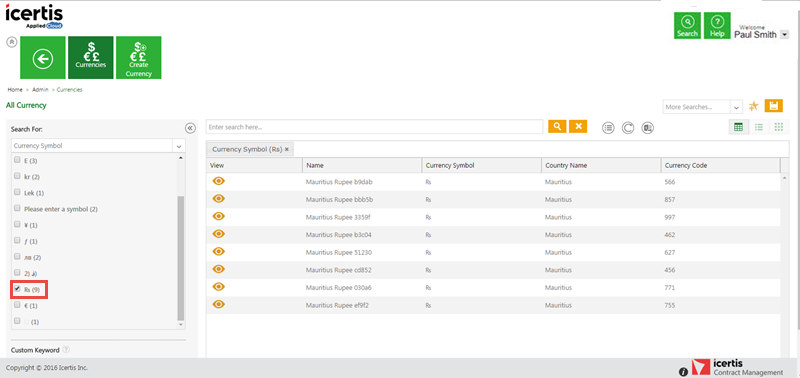
- Click the Select Field list under Search For and select appropriate item. Search results relevant to the item are displayed with a number in bracket. The number denotes the number of currencies that meet the search criteria.
- Type relevant keyword in the Custom Keyword box to narrow your search further, and click Apply.
- In the More Searches box, select your saved search, and click
 to mark the search term as favorite.
 - You can find your marked favorites below the tiles.
- Click the Currencies tile on the User Administration page. The Currencies page opens.

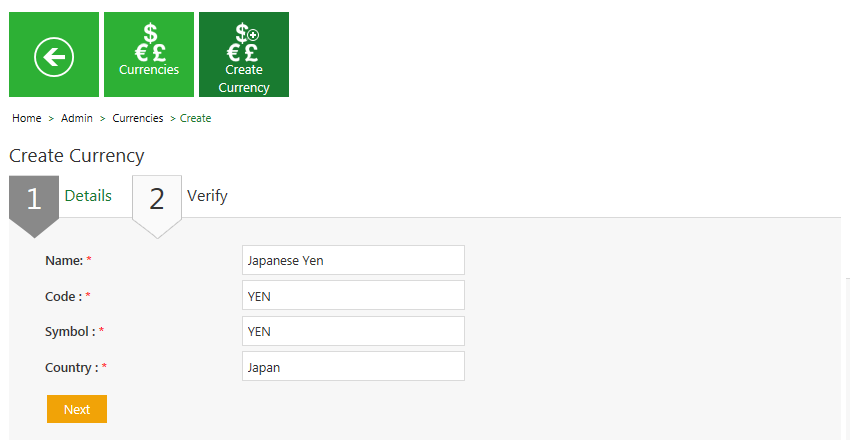
- Click the Create Currency tile. The Create Currency page opens and consists of following tabs:
- Details
- Verify
- Click Next to go to next tab. The Verify section opens.
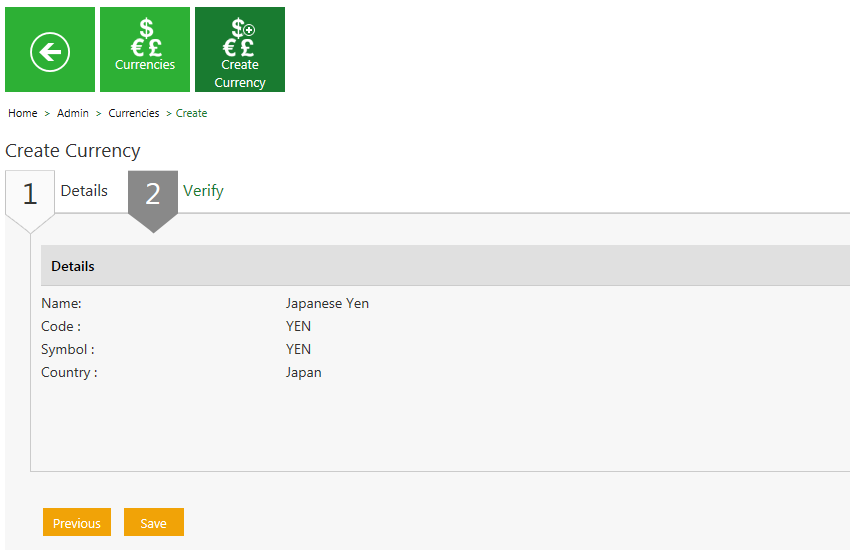
- Verify the details and click Save to create a currency.
- Click the Currencies tile on the User Administration page. The Currencies page opens.

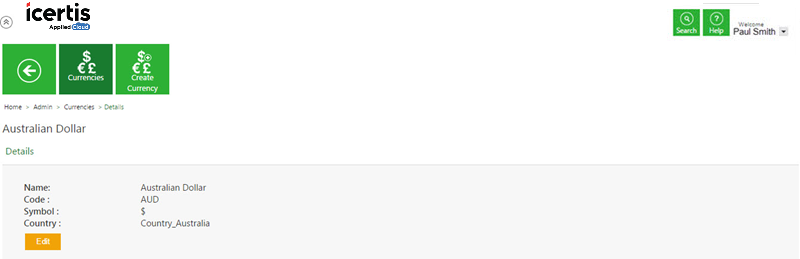
- Click Edit on the Details page. The Edit page opens.
- Update appropriate information, and click Next to open the Verify page.
- Verify the details you have updated, and then click Update to save the modifications.

Option 2
Type the keywords in the box provided above the list of currencies. A list of relevant currencies is displayed. Narrow your search results as follows:
| Search Term | Result |
| "..." | Type the search term in double quotation marks. It shows existing currencies that include the exact search term. |
| *...* | Type the search term in star characters. It shows existing currencies that include the exact search term. |
| *... | Prefix * to the search term. It shows existing currencies that end with this term. For example, *INR |
| ...* | Suffix * to the search term. It shows existing currencies that start with this term. |
Viewing the saved search terms
View your saved search terms with the following:

Creating a Currency
ICM allows you to create currencies that you can use while creating Contract Types.
To create a Currency:


Editing Currency
ICM allows you to edit currencies for your Contract Types.
To edit a currency:

Click  next to the relevant currency. The Currency Details page opens.

Related Topics: Agreement Management |
